Get started with MotionScore
Animation performance problems are often invisible in development. Most sites are developed on top of the range hardware, so we often don't know about performance problems until they're in the hands of our users.
MotionScore finds animation performance issues and tells you exactly how to fix them.
How it works
MotionScore works as a feedback loop. It performs audits, scores your website, identifies slow animations and provides actual fixes that you or your LLM can act upon.
Site analysis
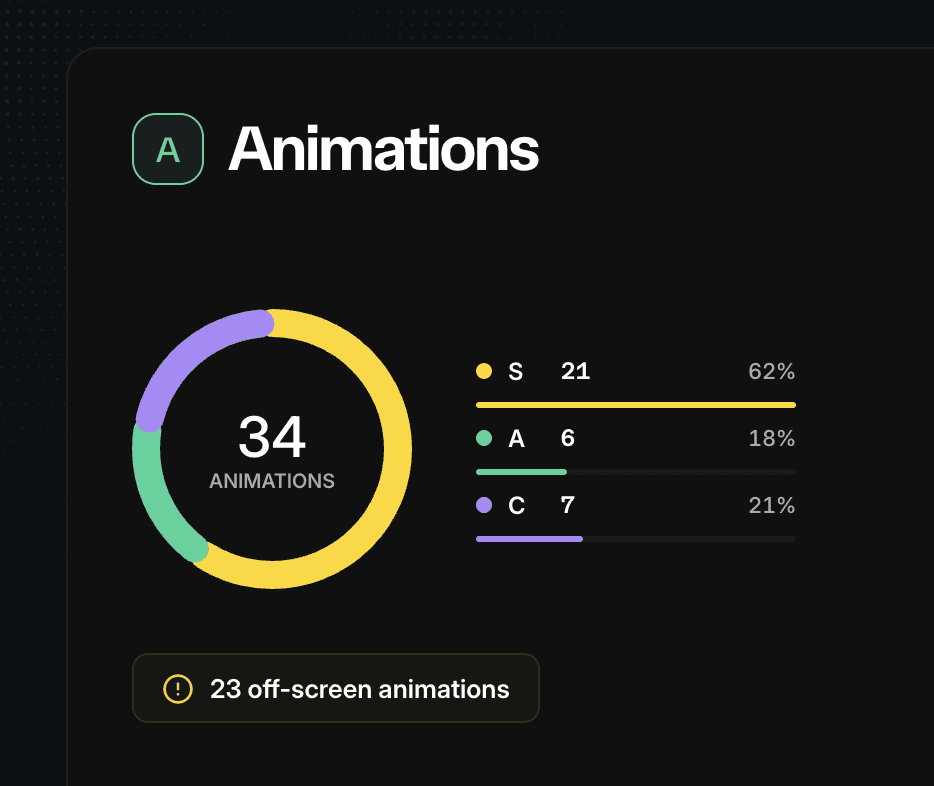
Give any URL to score.motion.dev or the CLI and MotionScore will audit the site, detecting and scoring every animation on the page.
Every animation, scroll animation, style/layout thrashing and GPU layer is graded and ranked by its performance impact.
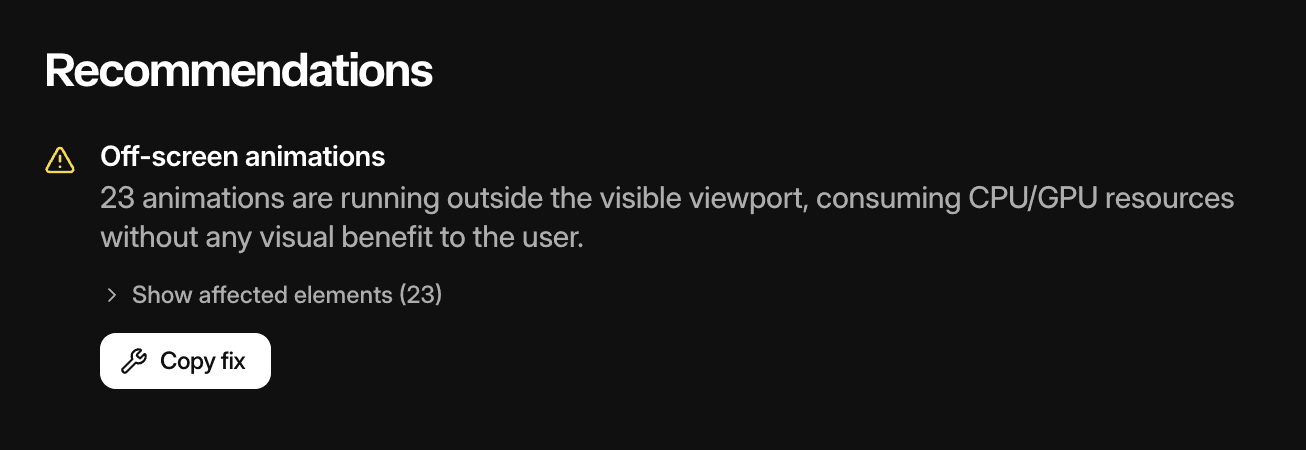
You receive a report, with each section returning recommendations with copy-paste prompts that you can hand directly to a URL to fix.
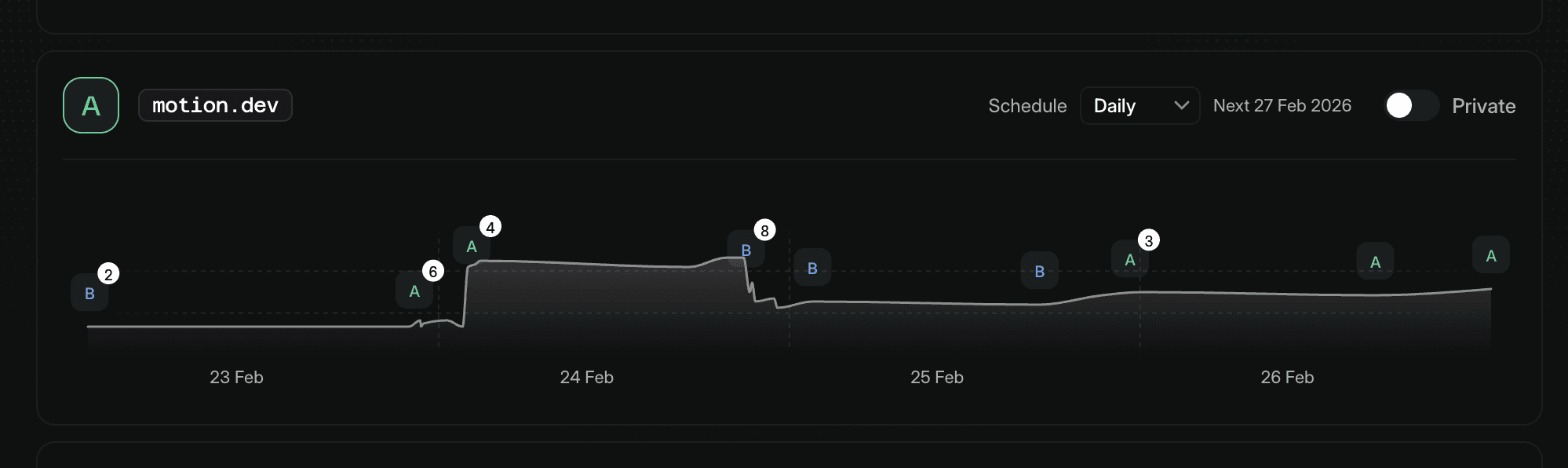
Paid accounts can schedule audits to run daily, weekly and monthly, and also set audits to private.
Code analysis
MotionScore includes an AI skill which can audit any part of your codebase.
Run /motion-audit on the Header component
It also grades each discovered animation, returning a report that you or the LLM can use to improve performance.
Because site analysis can be triggered via the CLI, the AI skill can use code analysis and site analysis in tandem to build a full picture about how your animations are created and how they affect web performance in reality.
CI
Paid users can drop the CLI into their deployment pipeline to gate releases based on animation performance.
npx motionscore <url> --private --threshold B
Set a minimum score threshold and MotionScore will pass or fail the build automatically so you can catch regressions before they reach production.
What gets scored
MotionScore audits four areas of animation performance.

Animations: CSS, WAAPI, and JavaScript-driven animations. Flags layout-triggering properties, off-screen work, large paint surfaces, and slow CSS variable inheritance.
Scroll animations: Scroll-linked and scroll-triggered animations including
ScrollTimeline,ViewTimeline,IntersectionObserverpatterns, and JavaScript scroll handlers.Thrashing: Layout and style thrashing from interleaved DOM reads and writes during mount and animation frames.
GPU pressure: Compositor layer count, texture memory, overlap-promoted layers, and persistent will-change declarations.
Each area is scored independently, then combined into an overall grade. Scoring is based on Motion's Web Animation Performance Tier List.
Tier system
Every animation receives a grade so you can see at-a-glance the impact of each individual animation:
Tier | Description |
|---|---|
S | Excellent. Animations are run entirely on the compositor, so animations aren't interrupted by work on the main thread. |
A | Animations don't trigger paint, but are run from the main thread. |
B | S/A-tier animations that require some style or layout measurements |
C | Animations trigger paint. |
D | Animations trigger layout. |
F | Per-frame style or layout thrashing. |
For a deep dive into the tier system and the principles behind the tier system, see The Web Animation Performance Tier List.
Each category (Animations, Scroll Animations, GPU pressure, thrashing) starts with a score of 100. Each animation, depending on its base tier, whether it's off-screen, a large paint surface etc, ends up with a score that detracts from that initial score.
Final category grades are based upon that final score.
Animation performance problems are often invisible in development. Most sites are developed on top of the range hardware, so we often don't know about performance problems until they're in the hands of our users.
MotionScore finds animation performance issues and tells you exactly how to fix them.
How it works
MotionScore works as a feedback loop. It performs audits, scores your website, identifies slow animations and provides actual fixes that you or your LLM can act upon.
Site analysis
Give any URL to score.motion.dev or the CLI and MotionScore will audit the site, detecting and scoring every animation on the page.
Every animation, scroll animation, style/layout thrashing and GPU layer is graded and ranked by its performance impact.
You receive a report, with each section returning recommendations with copy-paste prompts that you can hand directly to a URL to fix.
Paid accounts can schedule audits to run daily, weekly and monthly, and also set audits to private.
Code analysis
MotionScore includes an AI skill which can audit any part of your codebase.
Run /motion-audit on the Header component
It also grades each discovered animation, returning a report that you or the LLM can use to improve performance.
Because site analysis can be triggered via the CLI, the AI skill can use code analysis and site analysis in tandem to build a full picture about how your animations are created and how they affect web performance in reality.
CI
Paid users can drop the CLI into their deployment pipeline to gate releases based on animation performance.
npx motionscore <url> --private --threshold B
Set a minimum score threshold and MotionScore will pass or fail the build automatically so you can catch regressions before they reach production.
What gets scored
MotionScore audits four areas of animation performance.
Animations: CSS, WAAPI, and JavaScript-driven animations. Flags layout-triggering properties, off-screen work, large paint surfaces, and slow CSS variable inheritance.
Scroll animations: Scroll-linked and scroll-triggered animations including
ScrollTimeline,ViewTimeline,IntersectionObserverpatterns, and JavaScript scroll handlers.Thrashing: Layout and style thrashing from interleaved DOM reads and writes during mount and animation frames.
GPU pressure: Compositor layer count, texture memory, overlap-promoted layers, and persistent will-change declarations.
Each area is scored independently, then combined into an overall grade. Scoring is based on Motion's Web Animation Performance Tier List.
Tier system
Every animation receives a grade so you can see at-a-glance the impact of each individual animation:
Tier | Description |
|---|---|
S | Excellent. Animations are run entirely on the compositor, so animations aren't interrupted by work on the main thread. |
A | Animations don't trigger paint, but are run from the main thread. |
B | S/A-tier animations that require some style or layout measurements |
C | Animations trigger paint. |
D | Animations trigger layout. |
F | Per-frame style or layout thrashing. |
For a deep dive into the tier system and the principles behind the tier system, see The Web Animation Performance Tier List.
Each category (Animations, Scroll Animations, GPU pressure, thrashing) starts with a score of 100. Each animation, depending on its base tier, whether it's off-screen, a large paint surface etc, ends up with a score that detracts from that initial score.
Final category grades are based upon that final score.
Animation performance problems are often invisible in development. Most sites are developed on top of the range hardware, so we often don't know about performance problems until they're in the hands of our users.
MotionScore finds animation performance issues and tells you exactly how to fix them.
How it works
MotionScore works as a feedback loop. It performs audits, scores your website, identifies slow animations and provides actual fixes that you or your LLM can act upon.
Site analysis
Give any URL to score.motion.dev or the CLI and MotionScore will audit the site, detecting and scoring every animation on the page.
Every animation, scroll animation, style/layout thrashing and GPU layer is graded and ranked by its performance impact.
You receive a report, with each section returning recommendations with copy-paste prompts that you can hand directly to a URL to fix.
Paid accounts can schedule audits to run daily, weekly and monthly, and also set audits to private.
Code analysis
MotionScore includes an AI skill which can audit any part of your codebase.
Run /motion-audit on the Header component
It also grades each discovered animation, returning a report that you or the LLM can use to improve performance.
Because site analysis can be triggered via the CLI, the AI skill can use code analysis and site analysis in tandem to build a full picture about how your animations are created and how they affect web performance in reality.
CI
Paid users can drop the CLI into their deployment pipeline to gate releases based on animation performance.
npx motionscore <url> --private --threshold B
Set a minimum score threshold and MotionScore will pass or fail the build automatically so you can catch regressions before they reach production.
What gets scored
MotionScore audits four areas of animation performance.
Animations: CSS, WAAPI, and JavaScript-driven animations. Flags layout-triggering properties, off-screen work, large paint surfaces, and slow CSS variable inheritance.
Scroll animations: Scroll-linked and scroll-triggered animations including
ScrollTimeline,ViewTimeline,IntersectionObserverpatterns, and JavaScript scroll handlers.Thrashing: Layout and style thrashing from interleaved DOM reads and writes during mount and animation frames.
GPU pressure: Compositor layer count, texture memory, overlap-promoted layers, and persistent will-change declarations.
Each area is scored independently, then combined into an overall grade. Scoring is based on Motion's Web Animation Performance Tier List.
Tier system
Every animation receives a grade so you can see at-a-glance the impact of each individual animation:
Tier | Description |
|---|---|
S | Excellent. Animations are run entirely on the compositor, so animations aren't interrupted by work on the main thread. |
A | Animations don't trigger paint, but are run from the main thread. |
B | S/A-tier animations that require some style or layout measurements |
C | Animations trigger paint. |
D | Animations trigger layout. |
F | Per-frame style or layout thrashing. |
For a deep dive into the tier system and the principles behind the tier system, see The Web Animation Performance Tier List.
Each category (Animations, Scroll Animations, GPU pressure, thrashing) starts with a score of 100. Each animation, depending on its base tier, whether it's off-screen, a large paint surface etc, ends up with a score that detracts from that initial score.
Final category grades are based upon that final score.