CLI
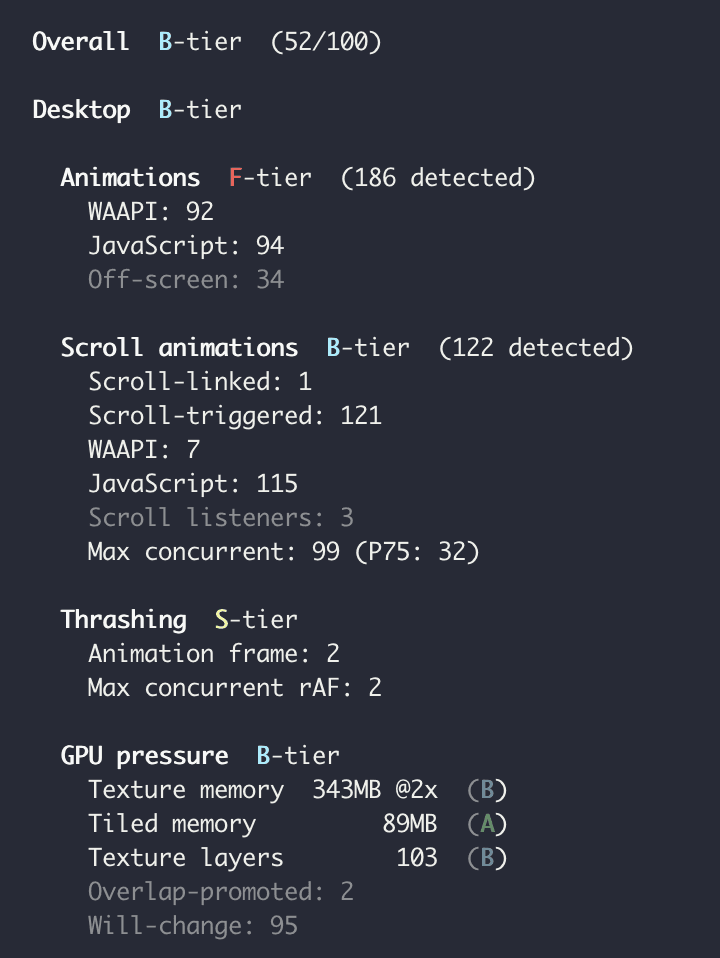
The MotionScore CLI runs animation performance audits from your terminal. It launches a local headless browser, analyses scroll and mount animations, measures GPU pressure, and detects thrashing across both mobile and desktop viewports.
At the end of the audit you'll receive an audit that grades your animation performance, plus a sharable URL.
Paid accounts can additionally run private audits.
Install
No installation required. Run directly with npx:
Free accounts must run motionscore within a GitHub repo.
Authentication
All paid accounts can generate an API token, set to a MOTIONSCORE_TOKEN environment variable for higher usage limits.
CI/CD integration
Pro users can set the —threshold option to fail builds that don't meet your performance standard.
Cloud audits
By default, the CLI launches a local Chromium instance. Pro users can use the —cloud option to run the audit on MotionScore's cloud infrastructure instead. This is useful in CI environments where you don't want to install a browser on each run.
Private audits
By default, audit results are publicly accessible. Pro users can use the --private option to keep audits private, especially useful when auditing staging URLs.
Options
—mobile-only
Only audit the mobile viewport.
—desktop-only
Only audit the desktop viewport.
—cloud
Pro accounts only.
Run the audit on the cloud instead of a local Puppeteer instance.
—private
Pro accounts only.
Marks the audit as private. Unauthenticated users will see a 404 page when visiting this URL.
—no-upload
Pro accounts only.
If set, skips uploading audits to score.motion.dev.
—threshold
Pro accounts only.
Exit with error code 1 if the overall tier is worse than the provided grade.
Accepts: A, B, C, D, F.
—json
Pro accounts only.
Returns the raw JSON report instead of the formatted human-readable report.
—help
Show all available options.
The MotionScore CLI runs animation performance audits from your terminal. It launches a local headless browser, analyses scroll and mount animations, measures GPU pressure, and detects thrashing across both mobile and desktop viewports.
At the end of the audit you'll receive an audit that grades your animation performance, plus a sharable URL.
Paid accounts can additionally run private audits.
Install
No installation required. Run directly with npx:
Free accounts must run motionscore within a GitHub repo.
Authentication
All paid accounts can generate an API token, set to a MOTIONSCORE_TOKEN environment variable for higher usage limits.
CI/CD integration
Pro users can set the —threshold option to fail builds that don't meet your performance standard.
Cloud audits
By default, the CLI launches a local Chromium instance. Pro users can use the —cloud option to run the audit on MotionScore's cloud infrastructure instead. This is useful in CI environments where you don't want to install a browser on each run.
Private audits
By default, audit results are publicly accessible. Pro users can use the --private option to keep audits private, especially useful when auditing staging URLs.
Options
—mobile-only
Only audit the mobile viewport.
—desktop-only
Only audit the desktop viewport.
—cloud
Pro accounts only.
Run the audit on the cloud instead of a local Puppeteer instance.
—private
Pro accounts only.
Marks the audit as private. Unauthenticated users will see a 404 page when visiting this URL.
—no-upload
Pro accounts only.
If set, skips uploading audits to score.motion.dev.
—threshold
Pro accounts only.
Exit with error code 1 if the overall tier is worse than the provided grade.
Accepts: A, B, C, D, F.
—json
Pro accounts only.
Returns the raw JSON report instead of the formatted human-readable report.
—help
Show all available options.
The MotionScore CLI runs animation performance audits from your terminal. It launches a local headless browser, analyses scroll and mount animations, measures GPU pressure, and detects thrashing across both mobile and desktop viewports.
At the end of the audit you'll receive an audit that grades your animation performance, plus a sharable URL.
Paid accounts can additionally run private audits.
Install
No installation required. Run directly with npx:
Free accounts must run motionscore within a GitHub repo.
Authentication
All paid accounts can generate an API token, set to a MOTIONSCORE_TOKEN environment variable for higher usage limits.
CI/CD integration
Pro users can set the —threshold option to fail builds that don't meet your performance standard.
Cloud audits
By default, the CLI launches a local Chromium instance. Pro users can use the —cloud option to run the audit on MotionScore's cloud infrastructure instead. This is useful in CI environments where you don't want to install a browser on each run.
Private audits
By default, audit results are publicly accessible. Pro users can use the --private option to keep audits private, especially useful when auditing staging URLs.
Options
—mobile-only
Only audit the mobile viewport.
—desktop-only
Only audit the desktop viewport.
—cloud
Pro accounts only.
Run the audit on the cloud instead of a local Puppeteer instance.
—private
Pro accounts only.
Marks the audit as private. Unauthenticated users will see a 404 page when visiting this URL.
—no-upload
Pro accounts only.
If set, skips uploading audits to score.motion.dev.
—threshold
Pro accounts only.
Exit with error code 1 if the overall tier is worse than the provided grade.
Accepts: A, B, C, D, F.
—json
Pro accounts only.
Returns the raw JSON report instead of the formatted human-readable report.
—help
Show all available options.