AI Context
This feature is available with Motion+
LLMs have supercharged our development workflows, but even now they still struggle to produce great animation code.
For example, have you ever fought with your LLM about still importing Motion from "framer-motion"? This is because it's trained on out-of-date information.
Or has it produced an animation that's almost right but ends up requiring a lot of prompting to fix? This is because LLMs can't visualise timing or easing curves, so they guess at values that often feel wrong.
Motion Studio provides a number of tools to improve the output of our LLMs by giving it the right information at the right time:
An MCP providing your LLM access to:
Latest Motion documentation
Source code for 330+ examples
Your saved transitions
Spring and transition visualisation
Rules file for best practises and performance advice
In short, it turns your AI editor into a Motion expert.
Documentation
The Motion Studio MCP includes the full, up-to-date Motion documentation. Every docs page is available as an MCP resource, and your LLM can search across them using the built-in search tool.
Every page is available as a resource, and is queryable by the LLM via the dedicated search tool.

Examples
Motion+ comes with a vault of 330+ examples, and they're all queryable by your LLM.
Instead of relying on outdated training data, your AI searches this curated collection of production-ready patterns and adapts them to your project. It's as easy as "build me an accordion", or "create a vertically scrolling Carousel".
Zero hallucinations: The code comes from the official Motion repository, not a generic LLM training set.
Instant & Offline: The server runs locally on your machine for zero latency.
Context aware: The AI reads the example code and understands why it works, allowing it to adapt the variables to your specific project names automatically.
Use prompts like:
Or:
Browsing
All examples are browsable via the Motion Examples gallery. It's easy to ask your editor to add a specific one:
adapt the app store motion example
The AI editor will, by default, select between JS, React and Vue based on your project. You can manually prompt it for a specific platform by mentioning it directly.
adapt the app store motion vue example
Saved transitions
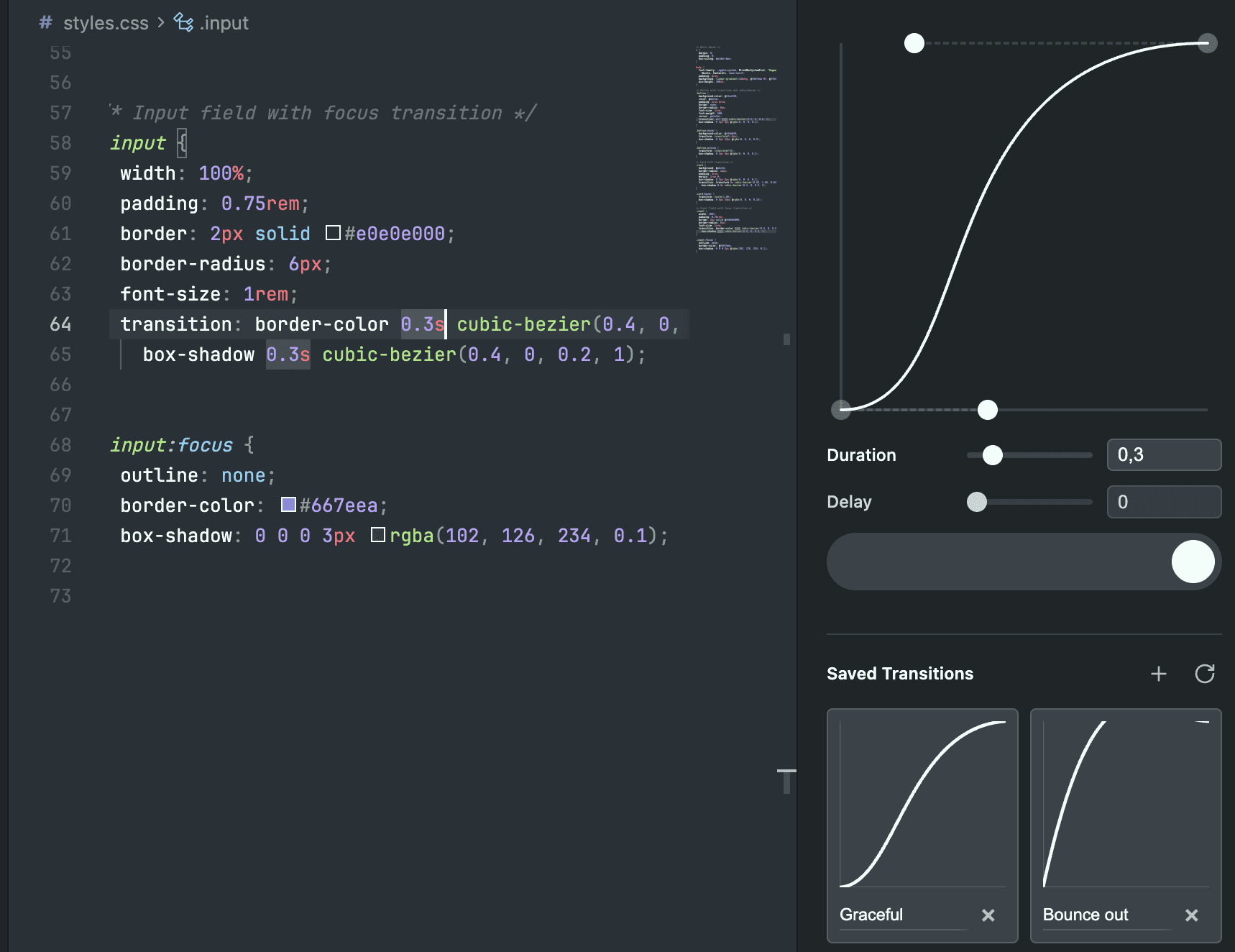
The Motion Studio extension includes a visual transition editor. Any transition you build there can be saved to your Motion+ profile, making it available to your LLM via the MCP.

On a user's profile, you can save their shared transitions to your own profile, too.
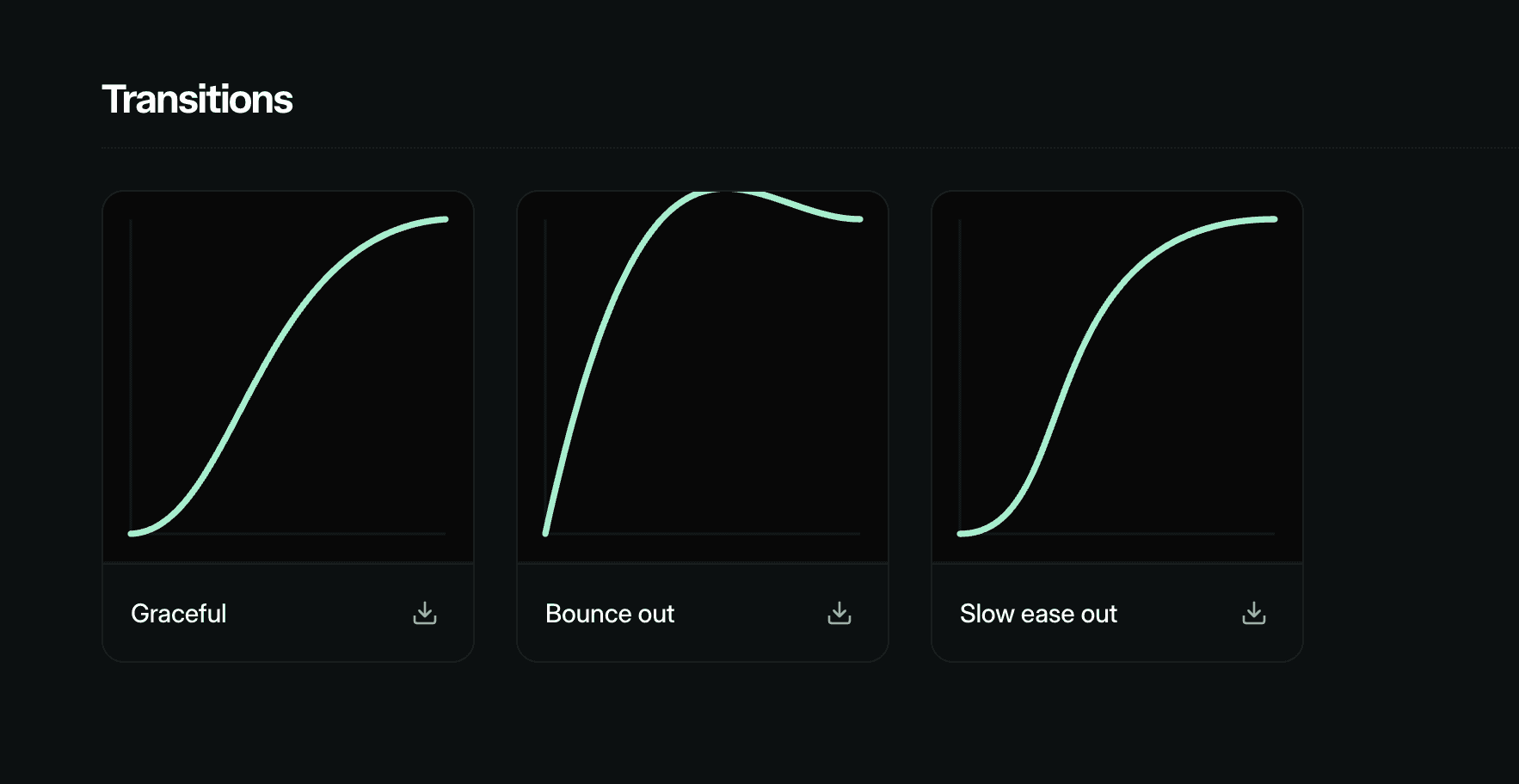
With the Motion Studio MCP, these shared transitions can be accessed via your LLM.
Visualise transitions
LLMs struggle to visualise animations but they can recognise images. Motion Studio lets you generate images from transitions to help your LLM understand them.
A prompt like:
Will use Motion to generate an image like this for your LLM:

Or, you can highlight existing Motion spring settings or cubic bezier definition and simply prompt "visualise this".

Motion skill
The /motion skill can improve your AI's animation skills by adding best practises, like:
When and how to add
will-change.Coding styles to improve per-frame performance.
When to use
transformvs independent transforms.
It contains advice for React, Vue and vanilla versions of Motion, as well as integration info for Radix and Base UI.
Install the Motion skill via the AI kit.
Get Motion Studio
Stop fighting your AI over animation code. Motion Studio is included with Motion+, along with premium Motion APIs, 330+ examples, 100+ tutorials, and early access to new features.
LLMs have supercharged our development workflows, but even now they still struggle to produce great animation code.
For example, have you ever fought with your LLM about still importing Motion from "framer-motion"? This is because it's trained on out-of-date information.
Or has it produced an animation that's almost right but ends up requiring a lot of prompting to fix? This is because LLMs can't visualise timing or easing curves, so they guess at values that often feel wrong.
Motion Studio provides a number of tools to improve the output of our LLMs by giving it the right information at the right time:
An MCP providing your LLM access to:
Latest Motion documentation
Source code for 330+ examples
Your saved transitions
Spring and transition visualisation
Rules file for best practises and performance advice
In short, it turns your AI editor into a Motion expert.
Documentation
The Motion Studio MCP includes the full, up-to-date Motion documentation. Every docs page is available as an MCP resource, and your LLM can search across them using the built-in search tool.
Every page is available as a resource, and is queryable by the LLM via the dedicated search tool.

Examples
Motion+ comes with a vault of 330+ examples, and they're all queryable by your LLM.
Instead of relying on outdated training data, your AI searches this curated collection of production-ready patterns and adapts them to your project. It's as easy as "build me an accordion", or "create a vertically scrolling Carousel".
Zero hallucinations: The code comes from the official Motion repository, not a generic LLM training set.
Instant & Offline: The server runs locally on your machine for zero latency.
Context aware: The AI reads the example code and understands why it works, allowing it to adapt the variables to your specific project names automatically.
Use prompts like:
Or:
Browsing
All examples are browsable via the Motion Examples gallery. It's easy to ask your editor to add a specific one:
adapt the app store motion example
The AI editor will, by default, select between JS, React and Vue based on your project. You can manually prompt it for a specific platform by mentioning it directly.
adapt the app store motion vue example
Saved transitions
The Motion Studio extension includes a visual transition editor. Any transition you build there can be saved to your Motion+ profile, making it available to your LLM via the MCP.

On a user's profile, you can save their shared transitions to your own profile, too.

With the Motion Studio MCP, these shared transitions can be accessed via your LLM.
Visualise transitions
LLMs struggle to visualise animations but they can recognise images. Motion Studio lets you generate images from transitions to help your LLM understand them.
A prompt like:
Will use Motion to generate an image like this for your LLM:

Or, you can highlight existing Motion spring settings or cubic bezier definition and simply prompt "visualise this".

Motion skill
The /motion skill can improve your AI's animation skills by adding best practises, like:
When and how to add
will-change.Coding styles to improve per-frame performance.
When to use
transformvs independent transforms.
It contains advice for React, Vue and vanilla versions of Motion, as well as integration info for Radix and Base UI.
Install the Motion skill via the AI kit.
Get Motion Studio
Stop fighting your AI over animation code. Motion Studio is included with Motion+, along with premium Motion APIs, 330+ examples, 100+ tutorials, and early access to new features.
LLMs have supercharged our development workflows, but even now they still struggle to produce great animation code.
For example, have you ever fought with your LLM about still importing Motion from "framer-motion"? This is because it's trained on out-of-date information.
Or has it produced an animation that's almost right but ends up requiring a lot of prompting to fix? This is because LLMs can't visualise timing or easing curves, so they guess at values that often feel wrong.
Motion Studio provides a number of tools to improve the output of our LLMs by giving it the right information at the right time:
An MCP providing your LLM access to:
Latest Motion documentation
Source code for 330+ examples
Your saved transitions
Spring and transition visualisation
Rules file for best practises and performance advice
In short, it turns your AI editor into a Motion expert.
Documentation
The Motion Studio MCP includes the full, up-to-date Motion documentation. Every docs page is available as an MCP resource, and your LLM can search across them using the built-in search tool.
Every page is available as a resource, and is queryable by the LLM via the dedicated search tool.

Examples
Motion+ comes with a vault of 330+ examples, and they're all queryable by your LLM.
Instead of relying on outdated training data, your AI searches this curated collection of production-ready patterns and adapts them to your project. It's as easy as "build me an accordion", or "create a vertically scrolling Carousel".
Zero hallucinations: The code comes from the official Motion repository, not a generic LLM training set.
Instant & Offline: The server runs locally on your machine for zero latency.
Context aware: The AI reads the example code and understands why it works, allowing it to adapt the variables to your specific project names automatically.
Use prompts like:
Or:
Browsing
All examples are browsable via the Motion Examples gallery. It's easy to ask your editor to add a specific one:
adapt the app store motion example
The AI editor will, by default, select between JS, React and Vue based on your project. You can manually prompt it for a specific platform by mentioning it directly.
adapt the app store motion vue example
Saved transitions
The Motion Studio extension includes a visual transition editor. Any transition you build there can be saved to your Motion+ profile, making it available to your LLM via the MCP.

On a user's profile, you can save their shared transitions to your own profile, too.

With the Motion Studio MCP, these shared transitions can be accessed via your LLM.
Visualise transitions
LLMs struggle to visualise animations but they can recognise images. Motion Studio lets you generate images from transitions to help your LLM understand them.
A prompt like:
Will use Motion to generate an image like this for your LLM:

Or, you can highlight existing Motion spring settings or cubic bezier definition and simply prompt "visualise this".

Motion skill
The /motion skill can improve your AI's animation skills by adding best practises, like:
When and how to add
will-change.Coding styles to improve per-frame performance.
When to use
transformvs independent transforms.
It contains advice for React, Vue and vanilla versions of Motion, as well as integration info for Radix and Base UI.
Install the Motion skill via the AI kit.
Get Motion Studio
Stop fighting your AI over animation code. Motion Studio is included with Motion+, along with premium Motion APIs, 330+ examples, 100+ tutorials, and early access to new features.