<div class="st-stepper">
  <span class="st-title" id="guests-label">Guests</span>
  <div class="st-control">
    <button class="st-step" data-step="-1" aria-label="Remove guest">
      <svg width="18" height="18" viewBox="0 0 18 18" aria-hidden="true">
        <path d="M4 9h10" />
      </svg>
    </button>
    <div class="st-value" role="status" aria-labelledby="guests-label">
      <span class="st-digit">2</span>
    </div>
    <button class="st-step" data-step="1" aria-label="Add guest">
      <svg width="18" height="18" viewBox="0 0 18 18" aria-hidden="true">
        <path d="M4 9h10M9 4v10" />
      </svg>
    </button>
  </div>
  <span class="st-hint">Hold to keep counting</span>
</div>

<script type="module">
  import { animate, press } from "motion"

  const valueElement = document.querySelector(".st-value")
  const minusButton = document.querySelector('[data-step="-1"]')
  const plusButton = document.querySelector('[data-step="1"]')

  const snap = { type: "spring", stiffness: 1218, damping: 70 }
  const ui = { type: "spring", stiffness: 305, damping: 33 }
  const lively = { type: "spring", stiffness: 622, damping: 17 }

  const min = 0
  const max = 99
  let value = 2

  function render(direction) {
    const previous = valueElement.querySelector(".st-digit:not(.st-leaving)")
    const next = document.createElement("span")
    next.className = "st-digit"
    next.textContent = value
    valueElement.append(next)

    // The old number leaves the way the count is going, the new one follows
    previous.classList.add("st-leaving")
    animate(
      previous,
      { y: -18 * direction, opacity: 0, filter: "blur(4px)" },
      { ...snap, opacity: { duration: 0.12 } },
    ).then(() => previous.remove())

    animate(
      next,
      {
        y: [18 * direction, 0],
        opacity: [0, 1],
        filter: ["blur(4px)", "blur(0px)"],
      },
      ui,
    )

    minusButton.toggleAttribute("aria-disabled", value === min)
    plusButton.toggleAttribute("aria-disabled", value === max)
  }

  function step(button) {
    const direction = Number(button.dataset.step)
    const nextValue = Math.min(max, Math.max(min, value + direction))

    if (nextValue === value) {
      // At a limit: a small shake says no
      animate(
        valueElement,
        { x: [0, 5 * direction, -3 * direction, 0] },
        { duration: 0.3 },
      )
      return
    }

    value = nextValue
    render(direction)
  }

  press(
    ".st-step",
    (button) => {
      // The first step happens on press down, like a native stepper
      step(button)
      animate(button, { scale: 0.88 }, snap)

      return {
        // After `hold`, the press is active and starts repeating
        onActive: () => step(button),
        onRepeat: () => {
          step(button)
          animate(button, { scale: [0.82, 0.88] }, lively)
        },
        onComplete: () => animate(button, { scale: 1 }, lively),
      }
    },
    { hold: 0.4, repeat: 0.08 },
  )
</script>

<style>
  .st-stepper {
    display: flex;
    flex-direction: column;
    align-items: center;
    gap: 14px;
    font-family: -apple-system, BlinkMacSystemFont, "Segoe UI", sans-serif;
    user-select: none;
    -webkit-user-select: none;
  }

  .st-title {
    font-size: 13px;
    font-weight: 500;
    color: #60687a;
  }

  .st-hint {
    font-size: 13px;
    color: #9aa1ae;
  }

  .st-control {
    display: flex;
    align-items: center;
    gap: 4px;
    padding: 6px;
    border-radius: 999px;
    background: #ffffff;
    box-shadow:
      0 0 0 1px rgba(24, 34, 46, 0.06),
      0 1px 2px rgba(24, 34, 46, 0.06),
      0 8px 24px rgba(24, 34, 46, 0.08);
  }

  .st-step {
    width: 48px;
    height: 48px;
    border: none;
    border-radius: 50%;
    padding: 0;
    display: flex;
    align-items: center;
    justify-content: center;
    background: #f1f3f6;
    color: #18222e;
    cursor: pointer;
    touch-action: none;
    -webkit-touch-callout: none;
    transition:
      background-color 0.2s,
      color 0.2s;
  }

  .st-step:hover {
    background: #e8ebf0;
  }

  .st-step[aria-disabled] {
    color: #b8bec9;
  }

  .st-step:focus-visible {
    outline: 2px solid #2563eb;
    outline-offset: 2px;
  }

  .st-step path {
    fill: none;
    stroke: currentColor;
    stroke-width: 1.75;
    stroke-linecap: round;
  }

  .st-value {
    position: relative;
    width: 72px;
    height: 48px;
    overflow: hidden;
  }

  .st-digit {
    position: absolute;
    inset: 0;
    display: flex;
    align-items: center;
    justify-content: center;
    font-size: 28px;
    font-weight: 600;
    letter-spacing: -0.02em;
    font-variant-numeric: tabular-nums;
    color: #18222e;
  }
</style>

 Long press
 Long press
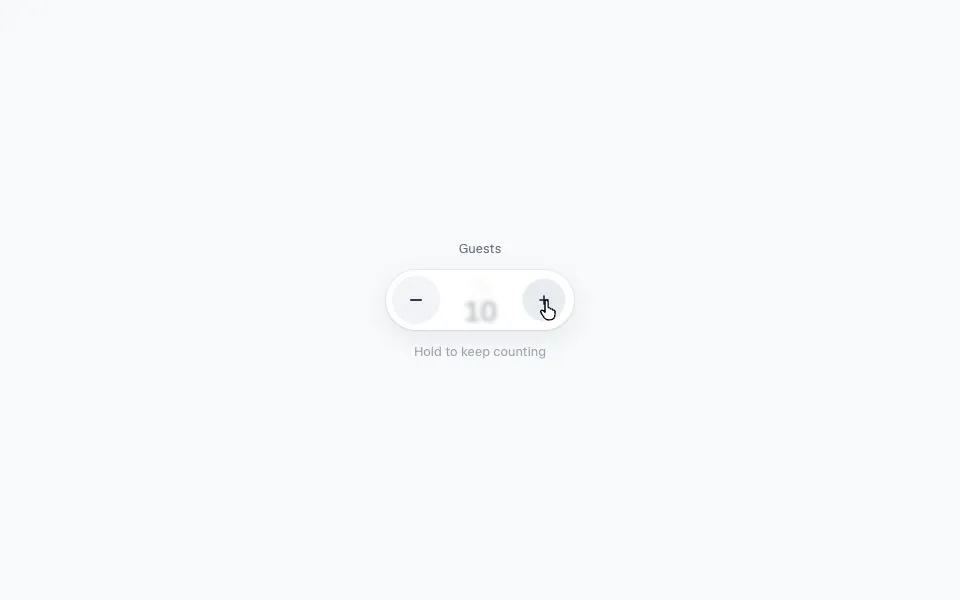 Press and hold to repeat