"use client"

import { AnimatePresence, motion, useAnimate } from "motion/react"
import type { TapInfo } from "motion/react"
import { useEffect, useRef, useState } from "react"

const ui = { type: "spring", stiffness: 305, damping: 33 } as const
const lively = { type: "spring", stiffness: 622, damping: 17 } as const

const red = "#ff3b5c"

interface Burst {
  id: number
  x: number
  y: number
  rotate: number
}

export default function DoubleTap() {
  const photo = useRef<HTMLDivElement>(null)
  const [likeButton, animateLike] = useAnimate()
  const [isLiked, setIsLiked] = useState(false)
  const [bursts, setBursts] = useState<Burst[]>([])
  const nextId = useRef(0)

  const setLiked = (liked: boolean) => {
    setIsLiked(liked)
    if (liked) {
      animateLike(likeButton.current, { scale: [1, 1.35, 1] }, lively)
    }
  }

  /**
   * With tap={{ count: 2 }}, onTap only fires after a second,
   * quick tap close to the first.
   */
  const onDoubleTap = (_event: PointerEvent, info: TapInfo) => {
    const rect = photo.current!.getBoundingClientRect()
    let x = info.point.x - window.scrollX - rect.left
    let y = info.point.y - window.scrollY - rect.top

    // Keyboard presses have no pointer position, so burst from the centre
    if (x <= 0 || y <= 0 || x >= rect.width || y >= rect.height) {
      x = rect.width / 2
      y = rect.height / 2
    }

    setBursts((current) => [
      ...current,
      { id: nextId.current++, x, y, rotate: Math.random() * 30 - 15 },
    ])
    setLiked(true)
  }

  return (
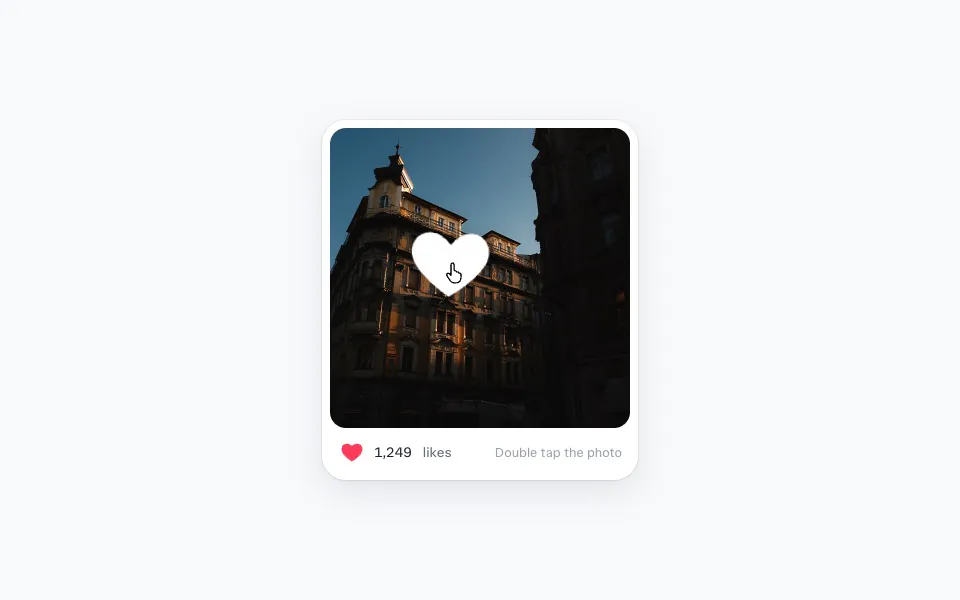
    <div className="dt-post">
      <motion.div
        ref={photo}
        className="dt-photo"
        tap={{ count: 2 }}
        onTap={onDoubleTap}
        aria-label="Double tap to like"
      >
        <img src="/photos/prague/image-02.jpg" alt="" draggable={false} />
        {bursts.map((burst) => (
          <HeartBurst
            key={burst.id}
            {...burst}
            onDone={() =>
              setBursts((current) => current.filter((b) => b.id !== burst.id))
            }
          />
        ))}
      </motion.div>
      <div className="dt-footer">
        <motion.button
          ref={likeButton}
          className="dt-like"
          onTap={() => setLiked(!isLiked)}
          whileTap={{ scale: 0.85 }}
          transition={ui}
          aria-label={isLiked ? "Unlike" : "Like"}
          aria-pressed={isLiked}
        >
          <svg width="24" height="24" viewBox="0 0 24 24" aria-hidden="true">
            <motion.path
              d={heartPath}
              initial={false}
              animate={{
                fill: isLiked ? red : "rgba(255, 59, 92, 0)",
                stroke: isLiked ? red : "#18222e",
              }}
              transition={{ duration: 0.2 }}
              strokeWidth={1.75}
              strokeLinejoin="round"
            />
          </svg>
        </motion.button>
        <div className="dt-count">
          <AnimatePresence mode="popLayout" initial={false}>
            <motion.span
              key={isLiked ? "liked" : "unliked"}
              initial={{
                y: isLiked ? 10 : -10,
                opacity: 0,
                filter: "blur(4px)",
              }}
              animate={{ y: 0, opacity: 1, filter: "blur(0px)" }}
              exit={{ y: isLiked ? -10 : 10, opacity: 0, filter: "blur(4px)" }}
              transition={ui}
            >
              {isLiked ? "1,249" : "1,248"}
            </motion.span>
          </AnimatePresence>
          <span className="dt-unit">likes</span>
        </div>
        <span className="dt-hint">Double tap the photo</span>
      </div>
      <Stylesheet />
    </div>
  )
}

function HeartBurst({ x, y, rotate, onDone }: Burst & { onDone: () => void }) {
  const [scope, animate] = useAnimate()
  const heart = useRef<SVGSVGElement>(null)

  useEffect(() => {
    const element = heart.current!
    // A bouncy spring overshoots, so the heart pops
    animate(
      element,
      { scale: [0, 1], opacity: [0, 1], rotate: [0, rotate] },
      {
        type: "spring",
        visualDuration: 0.3,
        bounce: 0.6,
        opacity: { duration: 0.1 },
      },
    )
    // The exit runs on the container, so it doesn't stop the pop
    animate(
      scope.current,
      { y: -48, scale: 0.7, opacity: 0 },
      { duration: 0.35, ease: "easeIn", delay: 0.5 },
    ).then(onDone)
  }, [])

  return (
    <div ref={scope} className="dt-burst" style={{ left: x, top: y }}>
      {particles.map((angle, i) => (
        <motion.span
          key={i}
          className="dt-particle"
          initial={{ x: 0, y: 0, scale: 1, opacity: 1 }}
          animate={{
            x: Math.cos(angle) * 64,
            y: Math.sin(angle) * 64,
            scale: 0,
            opacity: [1, 1, 0],
          }}
          transition={{ duration: 0.6, ease: [0.2, 0, 0, 1], delay: 0.06 }}
        />
      ))}
      <svg
        ref={heart}
        className="dt-heart"
        width="96"
        height="96"
        viewBox="0 0 24 24"
        aria-hidden="true"
      >
        <path d={heartPath} fill="#ffffff" />
      </svg>
    </div>
  )
}

const heartPath =
  "M12 20.5s-7.5-4.6-9.3-9.2C1.4 8 3.4 4.5 6.9 4.5c2.1 0 3.6 1.2 5.1 3 1.5-1.8 3-3 5.1-3 3.5 0 5.5 3.5 4.2 6.8-1.8 4.6-9.3 9.2-9.3 9.2z"

const particles = Array.from(
  { length: 8 },
  (_, i) => (i / 8) * Math.PI * 2 - Math.PI / 2,
)

function Stylesheet() {
  return (
    <style>{`
      .dt-post {
        width: min(300px, calc(100vh - 140px));
        padding: 8px;
        border-radius: 24px;
        background: #ffffff;
        box-shadow:
          0 0 0 1px rgba(24, 34, 46, 0.06),
          0 1px 2px rgba(24, 34, 46, 0.06),
          0 12px 32px rgba(24, 34, 46, 0.1);
        font-family: -apple-system, BlinkMacSystemFont, "Segoe UI", sans-serif;
        user-select: none;
        -webkit-user-select: none;
      }

      .dt-photo {
        position: relative;
        aspect-ratio: 1;
        border-radius: 16px;
        overflow: hidden;
        cursor: pointer;
        touch-action: manipulation;
        -webkit-tap-highlight-color: transparent;
      }

      .dt-photo:focus-visible {
        outline: 2px solid #2563eb;
        outline-offset: 2px;
      }

      .dt-photo img {
        width: 100%;
        height: 100%;
        object-fit: cover;
        display: block;
        pointer-events: none;
      }

      .dt-burst {
        position: absolute;
        width: 0;
        height: 0;
        pointer-events: none;
      }

      .dt-heart {
        opacity: 0;
        transform: scale(0);
        position: absolute;
        left: -48px;
        top: -48px;
        filter: drop-shadow(0 6px 16px rgba(0, 0, 0, 0.25));
      }

      .dt-particle {
        position: absolute;
        left: -4px;
        top: -4px;
        width: 8px;
        height: 8px;
        border-radius: 50%;
        background: #ffffff;
      }

      .dt-footer {
        display: flex;
        align-items: center;
        gap: 8px;
        padding: 10px 8px 6px;
      }

      .dt-like {
        width: 36px;
        height: 36px;
        margin: -4px;
        padding: 0;
        border: none;
        border-radius: 50%;
        background: transparent;
        display: flex;
        align-items: center;
        justify-content: center;
        cursor: pointer;
      }

      .dt-like:focus-visible {
        outline: 2px solid #2563eb;
      }

      .dt-count {
        position: relative;
        display: flex;
        gap: 4px;
        font-size: 14px;
        font-weight: 600;
        color: #18222e;
        font-variant-numeric: tabular-nums;
      }

      .dt-count > span:first-child {
        display: inline-block;
      }

      .dt-unit {
        font-weight: 400;
        color: #60687a;
      }

      .dt-hint {
        margin-left: auto;
        font-size: 13px;
        color: #9aa1ae;
        white-space: nowrap;
      }

      @media (max-height: 420px) {
        .dt-hint {
          display: none;
        }
      }
    `}</style>
  )
}

 Double tap to like
 Add to basket
 Add to basket