Interview: David Haz, creator of React Bits
We sit down with David Haz, creator of React Bits, about AI, build systems, productivity and more.

React Bits is an open-source collection of over 100 animated and interactive React components, many of which are built with Motion. Its focus on creativity and experimental design separates it in a world crowded with an abundance of <Button> components.
It recently crossed 30k stars on GitHub, and now with React Bits Pro on the horizon we felt like it's a good time to chat to David Haz, its creator.
Motion Magazine: You're incredibly prolific. How much % of your time do you dedicate towards React Bits vs your main sources of income?
David Haz: I think that’s the first time someone has ever called me “prolific”!
React Bits is essentially my open source side project that gained massive traction, which I never would have anticipated, because it started as a very amateur-ish, small collection of components, so I truly did not expect it to take off, but I kept pouring more time into it and here we are!
Until very recently, when we opened sponsorship options, it generated basically zero income.
My main source of income is my full-time job. I work as a Frontend Engineer and have been doing so for over six years now.
So when I’m not working for my full time job, I put as much time as I can into improving React Bits (and Vue Bits), and I’ve been doing that consistently for the past year.
Late nights, weekends, and any days off I can take, all go into building my own projects. If I had to give an exact answer, I’d say around 20% goes into React Bits. I still have to sleep eight hours.
Congrats on passing 30k stars on GitHub! Was there a single component that really put React Bits on the map, or was it more of a gradual build?
DH: Thank you! I think what really pushed React Bits forward was its uniqueness. That’s why I decided to call it “Bits,” so I wouldn’t be constrained by a single style or pattern.
That freedom is what drew people in, because it hadn’t been done quite like this anywhere else at the time.
Early on, I noticed that the <SplashCursor /> component got the most attention, but over time the library grew into so many impressive components that I honestly can’t keep track anymore.
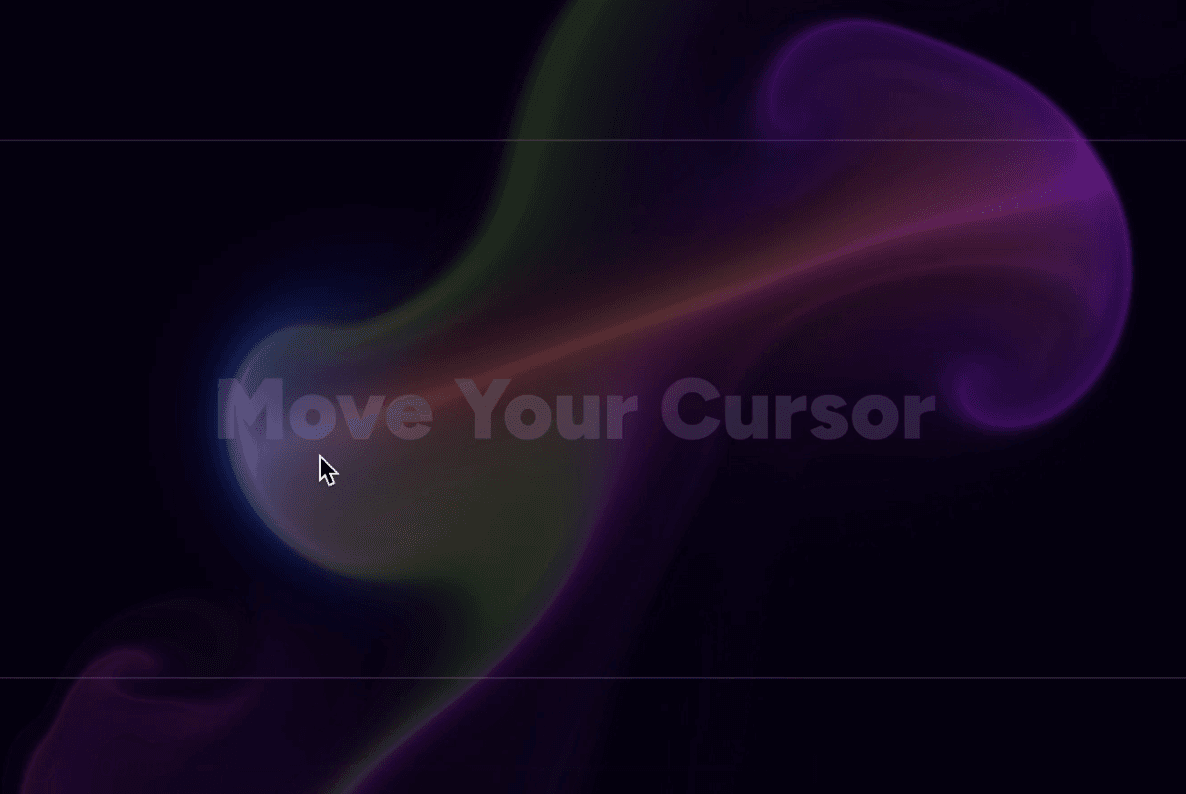
SplashCursor is super unique, are there any animation techniques or effects you tried that just didn't work out the way you hoped?
DH: It happens quite often, I end up abandoning components because some devices simply can’t handle them performance-wise, so I can’t ship them.
A lot of visually intense, high-quality WebGL components run into this issue, so I end up scrapping them.
I’m very hopeful this will improve as I move toward WebGPU implementations this year.
There's a ton of different Bits, and each comes in TS/JS, CSS/Tailwind, that's a ton of permutations for each. How do you write these, how do you test these? Or have you got a clever build system to take care of some of this?
DH: I wish I had a great answer here, but the truth is that a lot of the time I’m brute-forcing it.
The TS to JS transition is fairly straightforward, since we can transpile the files down to JavaScript and the code remains essentially the same, just without the types.
This is mostly a quality-of-life feature for people who choose not to use TypeScript. Instead of judging, I just provide an easy way to get clean JavaScript directly.
For the Tailwind to CSS conversion, I often use AI to convert components and then carefully review everything to make sure it matches 100%, both in code quality and visuals.
Testing is done entirely manually by myself, but also with a lot of help from our amazing open source community. I’ve fixed countless bugs thanks to people on GitHub.
One neat thing worth mentioning is my component setup script. I run it whenever I add a new component, and it creates the correct file structure for all four variants automatically:
npm run new:component <Category> <ComponentName>What was the moment you decided to make a Pro version of React Bits? Was it the plan from the start, or come as a result of its popularity?
DH: I never really planned to do it, but I felt like I owed it to the people who wanted something next level. I often get reactions like “How is this free?” even for React Bits, or people asking when the Pro version is coming out, long before it was even an idea for me.
So it was definitely more something others motivated me to do rather than my own original plan. I’m grateful it happened the way it did, and later rather than sooner, because it allowed me to provide a huge amount of free value to developers everywhere through React Bits.
One thing I never wanted to do under any circumstances was put a paywall on existing React Bits components. That’s why React Bits Pro is a completely new collection, which at launch will already probably be twice the size of React Bits itself. I’ve put a lot of work into it.
One thing I love about React Bits is the number of experimental or artistic components. Where do you get your inspiration for these?
DH: I spend more time on the internet than I’d like to admit. I find inspiration everywhere, from sites like CodePen to Awwwards and Dribbble. Whenever I see something that really makes my eyes widen, I bookmark it.
When I want to build something new, I go through those bookmarks, and that’s usually where the process starts. I then iterate, break things (of course), and after a while I get a result I’m satisfied with.
Your components use a mix of CSS, GSAP, and Motion for animations. When do you find yourself reaching for each (and how do I make sure it's always Motion)?
DH: Early on, I mostly used GSAP because it was what I was most familiar with from previous experience. These days, I try to reach for Motion first, and that’s very apparent in React Bits Pro, where I barely used GSAP at all.
One thing I really like about GSAP is its ecosystem of plugins and its easing system. I’d love to see Motion’s easing presets get an upgrade. I also still reach for GSAP more often when it comes to scroll-based animations, mainly because there are far more examples out there using GSAP for that use case.
It would be great to see more scroll animation examples in the Motion docs, or more visibility for community-built scroll animations.
What are your go-to Motion APIs when you're building something new?
DH: Ninety-nine percent of the time, it’s <AnimatePresence /> for clean enter and exit animations. You can do so much with it alone, and I used it for almost every block in React Bits Pro.
Of course, I also rely heavily on motion components themselves. I love how simple they are. It’s incredibly easy to animate elements on load, exit, hover, and more.
I also frequently use Motion’s hooks like useSpring, useMotionValue, useVelocity, and useAnimate when I need very custom or specific interactions with complex timelines.
Setting up timelines is surprisingly effortless, as you can see below:
import { motion, useAnimate, stagger } from "motion/react";

export default function App() {
  const [scope, animate] = useAnimate();

  useEffect(() => {
    animate([
      [".backdrop", { opacity: [0, 1] }, { duration: 0.3 }],
      [
        ".card",
        { opacity: [0, 1], y: [20, 0], scale: [0.95, 1] },
        { duration: 0.45, ease: [0.16, 1, 0.3, 1], at: "+0.05" },
      ],
      [".title", { opacity: [0, 1], x: [-12, 0] }, { duration: 0.3, at: "<" }],
      [
        ".item",
        { opacity: [0, 1], y: [10, 0] },
        { delay: stagger(0.08), at: "-0.1" },
      ],
      [
        ".shine",
        { x: ["-120%", "140%"], opacity: [0, 0.4, 0] },
        { duration: 0.7, at: "+0.1" },
      ],
    ]);
  }, [animate]);
}
I built this animation in just a few minutes. It’s honestly too good.
How has AI affected your personal workflow when building components for React Bits?
DH: It has been nothing but positive for my workflow, although it did take some time to get comfortable relying on AI back when the models weren’t as good.
Today, I mostly use Opus 4.5 for any task where I need help, which is quite often, especially for complex WebGL work in React Bits components.
I also use AI extensively for bug fixes. When I fix a bug in one component, the same change needs to be synced across the other three variants. Since the bug is already solved, AI is by far the fastest way make sure the fix is applied to all variants without mistakes.
As AI tools continue to improve, how do you see that affect how people use component libraries like React Bits?
DH: AI has reached a very impressive stage where it can generate solid-looking UIs if you know how to prompt it properly. Still, I don’t see this as a threat to component libraries. If anything, I find it reassuring.
Take shadcn/ui as an example. It’s already part of system prompts at OpenAI and likely other companies as well, so models naturally reach for it when building UIs.
The same applies to React Bits. It becomes a powerful asset for agents or vibe-coding tools if you explicitly ask for those components to be used. AI on its own can’t yet come up with wildly creative concepts, but when it has access to a large collection of creative components like React Bits, that changes everything.
Another big advantage is that AI instantly understands how to use a component because it can fully read and reason about the code, which helps with proper integration.
So I would say one direction we’re clearly moving toward is component libraries acting as extensions of AI itself, helping developers build faster, better, and at the quality level people expect from a dev doing that same work manually.
Thanks for your time David! React Bits Pro releases February 2026.