"use client"
import { spring } from "motion"
import { AnimateView } from "motion/react-animate-view"
import { startTransition, useState } from "react"
export default function AppStore() {
const [selectedId, setSelectedId] = useState<string | null>(null)
const open = (id: string) => {
startTransition(() => setSelectedId(id))
}
const close = () => {
startTransition(() => setSelectedId(null))
}
return (
<AnimateView>
<div id="app-store">
{selectedId ? (
<OpenCard id={selectedId} close={close} />
) : (
<ListView open={open} />
)}
<StyleSheet />
</div>
</AnimateView>
)
}
function ListView({ open }: { open: (id: string) => void }) {
return (
<div>
<header>
<div>
<h2 className="store-title">Today</h2>
</div>
<img
className="avatar"
src="https://images.motion.dev/magazine/ulZPf8sPx65JUasbGmCjltf6uEU.png"
alt=""
/>
</header>
<ul className="card-list">
{items.map((item) => (
<li key={item.id} className={`card ${item.theme || ""}`}>
<Card {...item} open={() => open(item.id)} />
</li>
))}
</ul>
</div>
)
}
function Card({
id,
title,
category,
open,
top,
bottom,
width = "100%",
left,
}: CardProps) {
return (
<AnimateView
name={`card-${id}`}
transition={{
type: spring,
visualDuration: 0.3,
bounce: 0.2,
}}
>
<div className="card-content" onClick={open}>
<div className="card-image-container">
<img
className="card-image"
src={`/photos/app-store/${id}.jpg`}
alt=""
style={{ top, bottom, width, left }}
/>
</div>
<div className="title-container">
<span className="h6">{category}</span>
<h2 className="h3">{title}</h2>
</div>
</div>
</AnimateView>
)
}
function OpenCard({ id, close }: { id: string; close: VoidFunction }) {
const item = items.find((item) => item.id === id)!
return (
<div>
<div className="overlay" onClick={close} />
<div className={`card-content-container open ${item.theme || ""}`}>
<CardContent {...item} />
</div>
</div>
)
}
function CardContent({
id,
top,
bottom,
width = "100%",
left,
category,
title,
content,
}: Item) {
return (
<AnimateView
name={`card-${id}`}
transition={{
type: spring,
visualDuration: 0.4,
bounce: 0.3,
}}
>
<div className="card-content">
<div className="card-image-container">
<img
className="card-image"
src={`/photos/app-store/${id}.jpg`}
alt=""
style={{ top, bottom, width, left }}
/>
</div>
<div className="title-container">
<span className="h6">{category}</span>
<h2 className="h3">{title}</h2>
</div>
<div className="content-container small">{content}</div>
</div>
</AnimateView>
)
}
/** ============== Styles ================ */
function StyleSheet() {
return (
<style>{`
#sandbox {
justify-content: flex-start;
}
::view-transition-image-pair(*) {
mix-blend-mode: normal;
}
@media (max-width: 620px) {
body {
overflow: hidden;
}
}
body {
scrollbar-gutter: stable;
}
#example-container {
width: 100%;
}
#app-store {
width: 100%;
max-width: 990px;
display: flex;
flex-direction: column;
padding-top: 150px;
padding-bottom: 150px;
}
#app-store,
#app-store * {
box-sizing: border-box;
}
#app-store header {
position: relative;
margin-bottom: 20px;
display: flex;
align-items: center;
justify-content: space-between;
}
#app-store .avatar {
background: var(--layer);
border-radius: 50%;
border: 1px solid var(--divider);
width: 40px;
height: 40px;
overflow: hidden;
object-fit: cover;
}
.store-title {
font-variation-settings: "opsz" 20, "wght" 640;
font-size: 34px;
margin: 5px 0;
letter-spacing: -0.05em;
color: var(--text);
}
#app-store ul,
#app-store li {
list-style: none;
padding: 0;
margin: 0;
}
#app-store p.big {
margin-bottom: 10px;
}
#app-store .card-list {
display: flex;
flex-wrap: wrap;
align-content: flex-start;
gap: 20px;
}
#app-store .card {
position: relative;
padding: 0px;
height: 420px;
flex: 0 0 40%;
box-sizing: border-box;
}
#app-store .card:nth-child(4n + 1),
#app-store .card:nth-child(4n + 4) {
flex: 0 1 calc(60% - 20px);
}
.card-content-container {
width: 100%;
height: 100%;
position: relative;
display: block;
pointer-events: none;
display: flex;
flex-direction: column;
justify-content: flex-end;
}
.card-content-container.open {
top: 0;
left: 0;
right: 0;
position: fixed;
z-index: 1000001;
overflow: hidden;
padding: 40px 0;
justify-content: center;
}
.dark .h3, .dark span {
color: var(--black);
}
.card-content {
pointer-events: auto;
position: relative;
border-radius: 20px;
background: var(--layer);
overflow: hidden;
width: 100%;
height: 100%;
margin: 0 auto;
cursor: pointer;
}
.open .card-content {
width: unset;
height: unset;
max-width: 700px;
overflow: hidden;
pointer-events: none;
cursor: default;
}
.card-image-container {
overflow: hidden;
height: 420px;
display: flex;
justify-content: stretch;
flex-direction: column;
position: relative;
}
.card-image {
width: 100%;
position: absolute;
}
.open .card-image-container,
.open .title-container {
z-index: 1;
}
.title-container {
position: absolute;
top: 15px;
left: 15px;
max-width: 300px;
}
.open .title-container {
top: 30px;
left: 30px;
}
.title-container h2 {
color: #fff;
margin: 8px 0;
text-wrap: balance;
}
.category {
color: #fff;
font-size: 14px;
text-transform: uppercase;
}
.overlay {
inset: 0;
z-index: 1000000;
position: fixed;
background: rgba(0, 0, 0, 0.8);
will-change: opacity;
}
.overlay a {
display: block;
position: fixed;
top: 0;
bottom: 0;
width: 100vw;
left: 50%;
transform: translateX(-50%);
}
.content-container {
padding: 35px;
max-width: 700px;
width: 90vw;
}
@media only screen and (max-width: 990px) {
#sandbox {
align-items: stretch;
}
body {
overflow: hidden;
}
#app-store {
padding: 60px 20px;
padding-left: 10px;
padding-right: 10px;
}
#app-store .card-list {
gap: 10px;
}
#app-store .card {
flex: 0 1 calc(50% - 5px);
height: 280px;
}
li .card-image {
top: unset !important;
bottom: -10px !important;
left: 0 !important;
right: 0 !important;
min-width: 250px;
min-height: 300px;
}
li .title-container {
visibility: hidden;
}
.card-image-container {
height: 280px;
}
#app-store .card:nth-child(4n + 1),
#app-store .card:nth-child(4n + 4) {
flex: 0 1 calc(50% - 5px);
max-width: 100%;
}
#app-store .card-content-container.open {
padding: 0;
}
}
`}</style>
)
}
/** ============== Mock Data ================ */
const items: Item[] = [
{
id: "a",
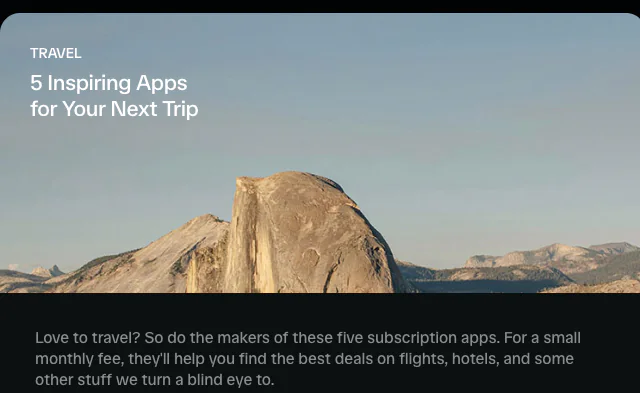
category: "Travel",
title: "5 Inspiring Apps for Your Next Trip",
content: (
<>
<p className="big">
Love to travel? So do the makers of these five subscription
apps. For a small monthly fee, they'll help you find the
best deals on flights, hotels, and some other stuff we turn
a blind eye to.
</p>
<p className="big">
Plan your perfect itinerary with intelligent recommendations
based on your interests, time, and credit history.
</p>
</>
),
top: -300,
},
{
id: "c",
category: "How to",
title: "Contemplate the Meaning of Life Twice a Day",
content: (
<>
<p className="big">
What is life? You can't spell "life" without "i". You also
can't spell "life" without "l", "f", and "e". Worth thinking
about.
</p>
<p className="big">
The only way to find out more about life is to think about
it. And the only way to think about it is twice daily using
an app.
</p>
<p className="big">
Apps? We got 'em. Therefore we got the meaning of life.
</p>
</>
),
bottom: -50,
theme: "dark",
width: "110%",
left: -20,
},
{
id: "d",
category: "Steps",
title: "Urban Exploration Apps for the Vertically-Inclined",
content: (
<>
<p className="big">
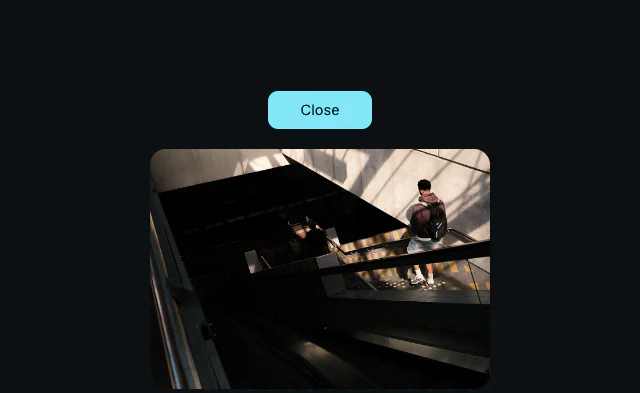
Get off the beaten path. Find the best views, skywalks, and
elevated gardens in your city.
</p>
<p className="big">
Locked door? No problem! This app crowdsources the access
code to every door in your city.
</p>
</>
),
theme: "dark",
width: "200%",
left: -100,
},
{
id: "b",
category: "Hats",
title: "Take Control of Your Hat Life With This Stunning New App",
content: (
<>
<p className="big">
Whether you're serious hat enthusiast, or just a filthy
casual, this new app revolutionizes how you organize, care
for, and expand your hat collection.
</p>
<p className="big">
Stay up to date with the latest hat trends, get personalized
hat care reminders, and use predictive analytics to discover
the last place you left your hat.
</p>
<p className="big">
Why follow the crowd when you can be the crowd?
</p>
</>
),
bottom: -100,
},
]
/** ============== Types ================ */
interface CardProps {
id: string
title: string
category: string
open: VoidFunction
top?: number
bottom?: number
width?: string
left?: number
theme?: "dark" | "light"
}
interface Item {
id: string
category: string
title: string
content: React.ReactNode
top?: number
bottom?: number
width?: string
left?: number
theme?: "dark" | "light"
}

 AnimateView: App Store
 AnimateView: Clip path
 AnimateView: Reorder