"use client"

import { arc, motion, useAnimate, useMotionValue } from "motion/react"
import { useRef, useState } from "react"

/**
 * ==============   Constants   ================
 */

const PRODUCT_SIZE = 160
const BASKET_BOX = 56
const FLY_SCALE = BASKET_BOX / PRODUCT_SIZE

type Direction = "auto" | "cw" | "ccw"

interface AddToBasketProps {
  strength?: number
  peak?: number
  rotate?: number
  duration?: number
  basketVelocityFactor?: number
  direction?: Direction
}

/**
 * ==============   Components   ================
 */

export default function AddToBasket({
  strength = 0.5,
  peak = 0.15,
  rotate = 0.9,
  duration = 0.45,
  basketVelocityFactor = 0.05,
  direction = "cw",
}: AddToBasketProps = {}) {
  const [scope, animate] = useAnimate()
  const productRef = useRef<HTMLDivElement>(null)
  const basketRef = useRef<HTMLDivElement>(null)
  const ringRef = useRef<HTMLDivElement>(null)
  const [isFlying, setIsFlying] = useState(false)
  const productX = useMotionValue(0)
  const productY = useMotionValue(0)

  const addToBasket = async () => {
    const product = productRef.current
    const basket = basketRef.current
    const ring = ringRef.current
    if (!product || !basket || !ring || isFlying) return
    setIsFlying(true)

    const from = product.getBoundingClientRect()
    const to = basket.getBoundingClientRect()
    const dx = to.left + to.width / 2 - (from.left + from.width / 2)
    const dy = to.top + to.height / 2 - (from.top + from.height / 2)

    // Fly into the basket, shrinking to its size, then clip it away right
    // at the end so it disappears into the basket.
    await animate(
      product,
      {
        x: dx,
        y: dy,
        scale: FLY_SCALE,
        opacity: [1, 1, 0],
      },
      {
        duration,
        path: arc({
          strength,
          peak,
          rotate,
          direction: direction === "auto" ? undefined : direction,
        }),
        ease: [0.74, 0.18, 0.93, 0.69],
        opacity: { inherit: true, times: [0, 0.95, 1] },
      },
    )

    // Knock the basket up and to the right with an explicit impact
    // velocity, then let a spring settle it back to rest.
    animate(
      basket,
      { x: 0, y: 0 },
      {
        type: "spring",
        stiffness: 500,
        damping: 12,
        x: {
          inherit: true,
          velocity: productX.getVelocity() * basketVelocityFactor,
        },
        y: {
          inherit: true,
          velocity: productY.getVelocity() * basketVelocityFactor,
        },
      },
    )

    // Ripple an outline out from the basket as it takes the hit.
    animate(
      ring,
      { scale: [1, 2.2], opacity: [0.8, 0] },
      { duration: 0.5, ease: "easeOut" },
    )

    // Snap the now-invisible product back to its resting spot, ready to
    // reappear.
    animate(
      product,
      {
        x: 0,
        y: 0,
        scale: 0.9,
        rotate: 0,
        opacity: 0,
        clipPath: "inset(0%)",
      },
      { duration: 0 },
    )

    // Bring a fresh product back into view, scaling in with a slight bounce.
    await animate(
      product,
      { opacity: 1, scale: 1 },
      {
        scale: { type: "spring", visualDuration: 0.4, bounce: 0.35 },
        opacity: { duration: 0.25, ease: "easeOut" },
      },
    )

    setIsFlying(false)
  }

  return (
    <div ref={scope} style={stage}>
      {/* Fill the sandbox so the basket sits in the true top-right. */}
      <style>{`#sandbox { position: relative }`}</style>

      <div ref={basketRef} style={basket}>
        <motion.div ref={ringRef} style={ring} />
        <BasketIcon />
      </div>

      <div style={center}>
        <motion.div
          ref={productRef}
          style={{ ...product, x: productX, y: productY }}
        >
          <span style={glyph}>👟</span>
        </motion.div>

        <div style={meta}>
          <span style={name}>Campus 00s</span>
          <span style={price}>£128</span>
        </div>

        <motion.button
          type="button"
          onClick={addToBasket}
          disabled={isFlying}
          whileHover={{ scale: 1.03 }}
          whileTap={{ scale: 0.97 }}
          style={{
            ...button,
            opacity: isFlying ? 0.55 : 1,
            pointerEvents: isFlying ? "none" : "auto",
          }}
        >
          Add to basket
        </motion.button>
      </div>
    </div>
  )
}

function BasketIcon() {
  return (
    <svg
      xmlns="http://www.w3.org/2000/svg"
      width="26"
      height="26"
      viewBox="0 0 24 24"
      fill="none"
      stroke="currentColor"
      strokeWidth="2"
      strokeLinecap="round"
      strokeLinejoin="round"
    >
      <path d="m15 11-1 9" />
      <path d="m19 11-4-7" />
      <path d="M2 11h20" />
      <path d="m3.5 11 1.6 7.4a2 2 0 0 0 2 1.6h9.8a2 2 0 0 0 2-1.6l1.7-7.4" />
      <path d="M4.5 15.5h15" />
      <path d="m5 11 4-7" />
      <path d="m9 11 1 9" />
    </svg>
  )
}

/**
 * ==============   Styles   ================
 */

const stage: React.CSSProperties = {
  position: "absolute",
  inset: 0,
  display: "flex",
  alignItems: "center",
  justifyContent: "center",
  overflow: "hidden",
  fontFamily: "var(--font-mono)",
  color: "var(--foreground)",
}

const basket: React.CSSProperties = {
  position: "absolute",
  top: 80,
  right: 80,
  width: BASKET_BOX,
  height: BASKET_BOX,
  display: "flex",
  alignItems: "center",
  justifyContent: "center",
  background: "var(--layer)",
  border: "1px solid var(--border)",
  color: "var(--accent)",
  willChange: "transform",
}

const ring: React.CSSProperties = {
  position: "absolute",
  inset: -1,
  border: "1px solid var(--accent)",
  opacity: 0,
  pointerEvents: "none",
  willChange: "transform, opacity",
}

const center: React.CSSProperties = {
  display: "flex",
  flexDirection: "column",
  alignItems: "center",
  gap: 18,
}

const product: React.CSSProperties = {
  width: PRODUCT_SIZE,
  height: PRODUCT_SIZE,
  display: "flex",
  alignItems: "center",
  justifyContent: "center",
  background: "var(--layer)",
  border: "1px solid var(--border)",
  willChange: "transform, opacity, clip-path",
}

const glyph: React.CSSProperties = {
  fontSize: 84,
  lineHeight: 1,
  userSelect: "none",
}

const meta: React.CSSProperties = {
  display: "flex",
  alignItems: "baseline",
  gap: 12,
  fontFamily: "var(--font-mono)",
  fontSize: 13,
  letterSpacing: "0.04em",
}

const name: React.CSSProperties = {
  color: "var(--foreground)",
}

const price: React.CSSProperties = {
  color: "var(--accent)",
}

const button: React.CSSProperties = {
  marginTop: 4,
  padding: "13px 26px",
  border: "none",
  background: "var(--accent)",
  color: "var(--background)",
  fontFamily: "var(--font-mono)",
  fontSize: 12,
  letterSpacing: "0.12em",
  textTransform: "uppercase",
  cursor: "pointer",
}

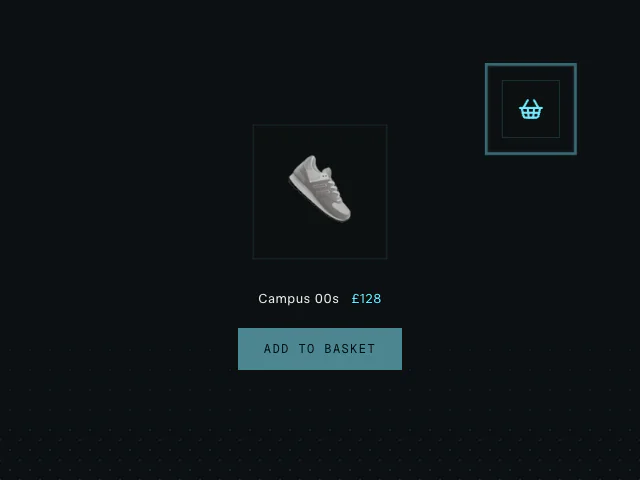 Add to basket
 Pointer collision detection
 Swipe actions