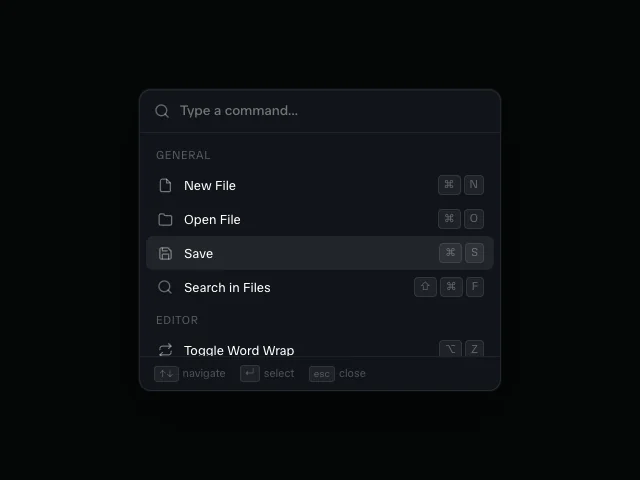
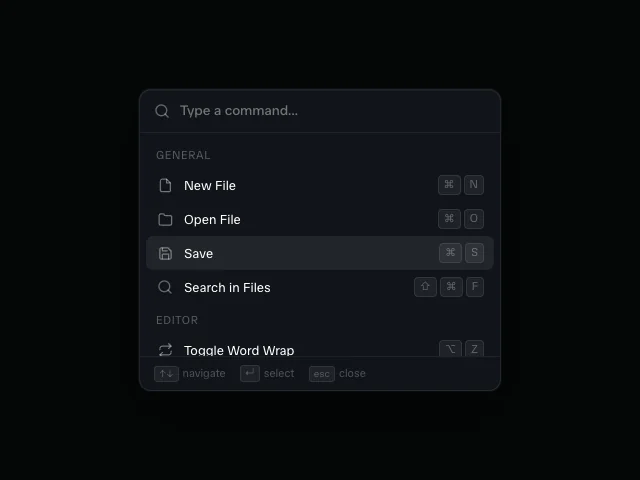
Command palette
Motion's fuzzy-filtered Cmd+K launcher choreography on Base UI's Dialog primitive, with a sliding selection highlight.
API reference
Components
<CommandPalette />
Fuzzy-filtered Cmd+K launcher on Base UI Dialog.
open?
Controlled open state.
defaultOpen?
Initial open state when uncontrolled. Defaults to false.
onOpenChange?
Called whenever Base UI requests an open-state change.
items
Commands the palette filters and lists.
groupOrder?
Order group headers render in.
maxListHeight?
Max height of the scrollable result list.
triggerLabel?
Collapsed trigger bar placeholder text.
triggerShortcut?
Trigger trailing shortcut badge glyphs.
inputPlaceholder?
Open dialog input placeholder.
inputAriaLabel?
Open dialog input accessible label.
dialogLabel?
Dialog accessible label.
footerHints?
Footer-strip hints.
renderEmpty?
Renders the no-results message.
onSelect?
Called when a row is selected.
Hooks
useCommandK
Headless open-state engine with global Cmd/Ctrl+K listener.
useCommandK(options: UseCommandKOptions): UseCommandKResultdefaultOpen?
Whether the palette starts open. Defaults to false.
open?
Controlled open state.
onOpenChange?
Called whenever the open state changes.
Returns
open
Whether the palette is open.
setOpen
Set the open state directly.
openPalette
Open the palette.
closePalette
Close the palette.
toggle
Toggle the palette (Cmd/Ctrl+K).
Functions
fuzzyMatch
Subsequence fuzzy match: every query character must appear in order in target.
fuzzyMatch(query: string, target: string): booleancommandMatches
Whether a command survives the trimmed lower-cased query.
commandMatches(command: CommandPaletteItem, query: string): booleanid
label
hint?
group?
icon?
shortcut?
keywords?
filterCommandGroups
Filters items by query and buckets survivors into groups.
filterCommandGroups(items: T[], groupOrder: string[] | undefined, query: string): CommandGroupView<T>[]nextCommandIndex
Wraps listbox keyboard navigation while keeping an empty result set at zero.
nextCommandIndex(currentIndex: number, resultCount: number, direction: "next" | "previous"): numbercommandShortcutPresentation
Formats shortcut badges for display and screen readers.
commandShortcutPresentation(shortcut: string[]): {
  separator: "→" | "+"
  label: string
}
Featured in
See the command palette composed into full sections.