
Motion+ is a one-time payment for lifetime updates. For this year's Black Friday, there's a massive 20% discount.
When we launched Motion+ "lifetime updates" was an easy promise to make. But, Motion+ is almost two years old now. We can look back and ask, if you bought it way back when, what would you have received over the last year - entirely for free?
Quite a lot, it turns out. With more on the horizon.
Motion UI
When I took Motion independent, I needed to offer a product directly to Motion's users. Corporate sponsors wouldn't be enough if I wanted to make this a long-term situation.
Motion+ launched the same month, essentially as a couple of wallpapers, a buy button, and the promise of lifetime updates.
Everything it's become since was launched as a free update for everyone who put their trust in that initial promise.
The first to arrive was the Cursor component, one month in. This was the first Motion UI component, a library of high-level components each designed to tackle a hard user interface problem in a unique or delightful way.
For example, our Ticker and Carousel components use a reprojection system, explained in this article, that ensures infinitely scrolling shelves are always full, but always by rendering the theoretical minimum number of cloned elements. Sometimes none at all.
Our Typewriter component, which, rather than dumping letters out via a setInterval callback, uses real academic research into human typing behaviours to emulate natural cadence based on the length of words, position in words and more.
Most recently, Gallery creates 3D image and video galleries where every arrangement can freely animate into each other, including detail and shelf views, with sensible shared layout animations and smooth high-res asset swapping.
Motion Examples
In early 2025 we launched Motion Examples, and it quickly became the reason most people bought Motion+. Each example shows off a novel technique and over a hundred are accompanied by a full tutorial.
There are now over 520+ Motion examples across React, Vue and JavaScript, and each can be copy-pasted or adapted into your project via the Motion AI Kit.
Based on analytics we know one of the favourites is the particle orb, a WebGL orb based on our homepage header, which spins, sways and squeezes:
And confetti, complete with springy button feedback and a randomised burst:
Motion Studio
In September 2026 we launched Motion Studio, a visual timeline editor that runs on your own site in dev mode.
Your Motion animations appear in the timeline automatically. Drag tracks, add keyframes and tune springs, and the preview updates live on your actual page. When it looks right, Motion+ users can have Studio send the change directly to your coding agent to write back to your code.
AI Kit
Even the best agents are trained on old docs, old code, and archaeological digs of Stack Overflow. So, left alone, they write animations the way people did years ago. The AI Kit fixes that.
Technically speaking, AI Kit is a single /motion skill which interfaces with our MCP servers.
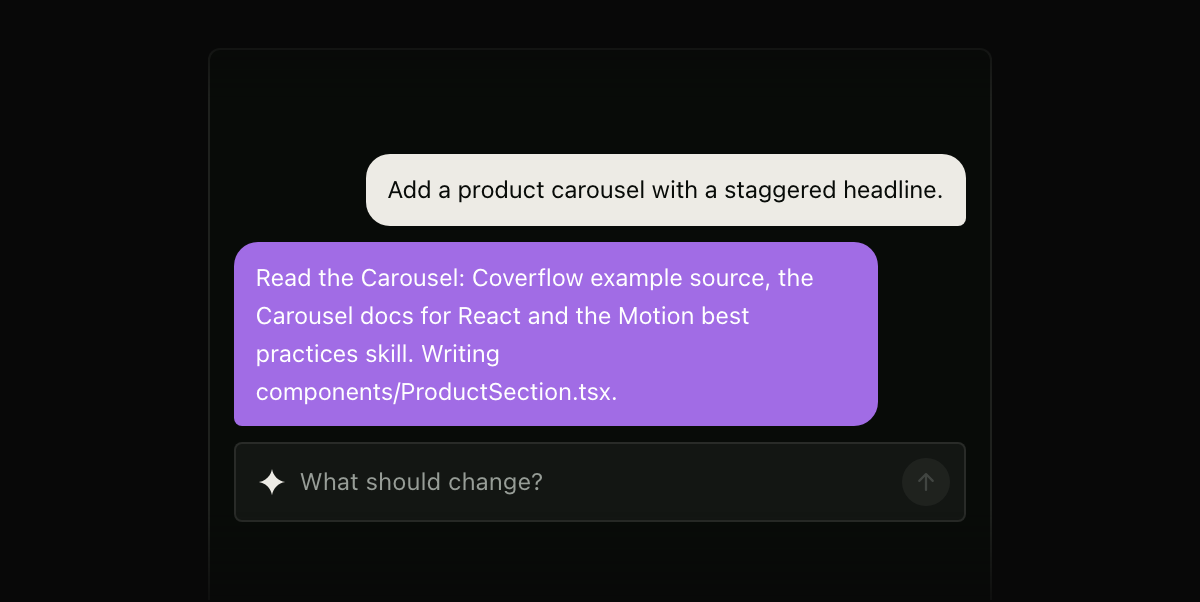
Practically speaking, it delivers the latest docs, hand-written examples and my best practices directly to your agent. Ask for "a product carousel with a staggered headline", and your agent reads the Carousel example and docs before it writes a line.
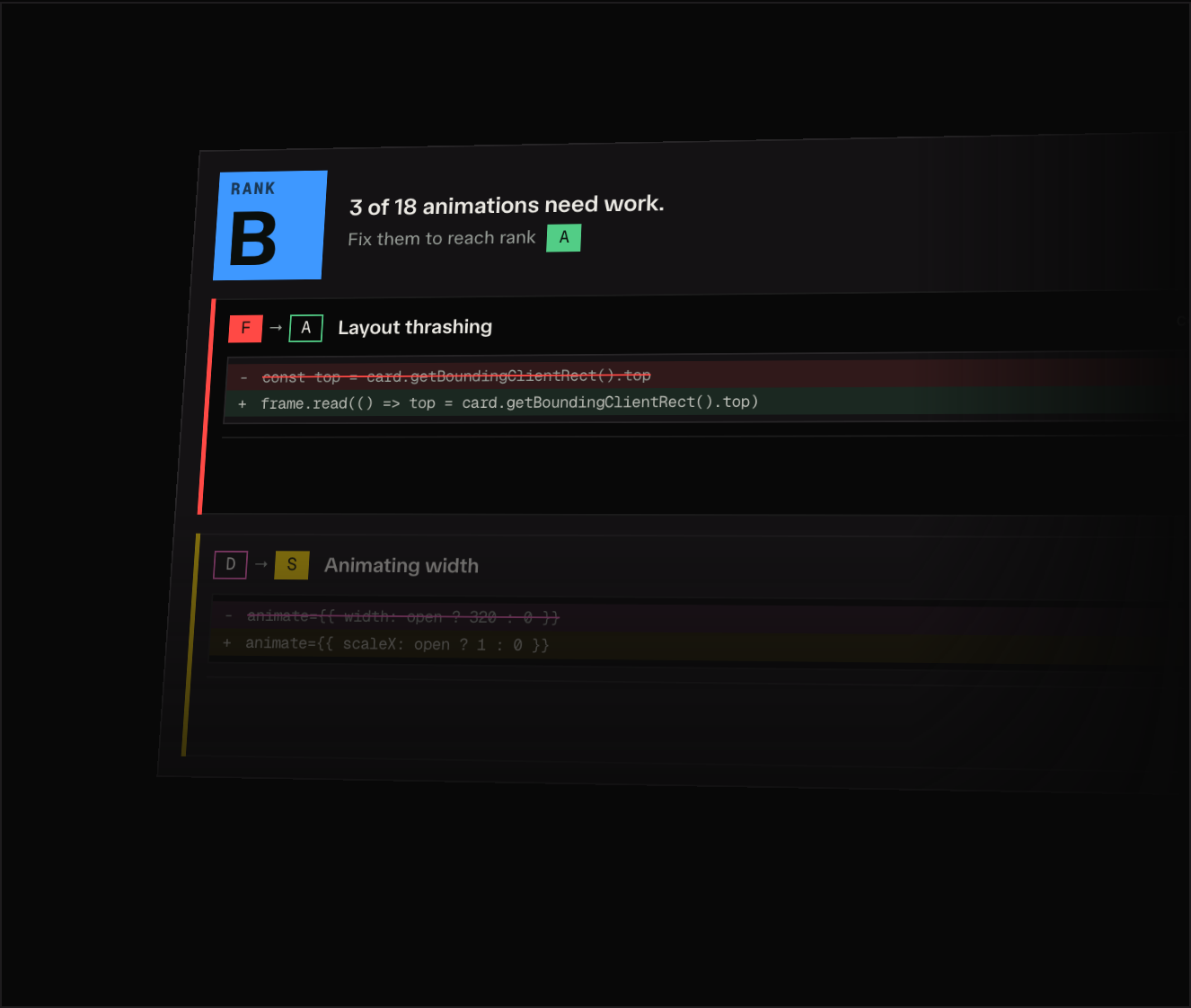
It also checks its own work. Performance Doctor audits your animations, gives each one a MotionScore grade from S to F for its render cost and ranks the whole project.
Your diagnosis is rendered as a readable MCP App where you can review potential changes and fix them with a single click.
Early access
Motion+ members get new APIs first, often months or sometimes years before everyone else. Their feedback shapes the API while it can still change.
The vanilla hover() and press() gestures started life in Motion+ in December 2024, with the View Transition API-based animateView for vanilla and AnimateView for React following soon after. Then finally Motion's layout animations launched for everyone with animateLayout.
All of these are now part of Motion itself.
Right now, members are trying AnimateActivity and AnimateSuspense, for animating React's Activity and Suspense boundaries, with more APIs coming soon.
Supporting Motion
There's one more thing your Motion+ purchase buys. It's hardly the thing I put at the top of the landing page but it is, at least, the one I personally appreciate the most.
Motion is open source, MIT licensed and independent. Along with our sponsors, Motion+ is what pays for that. Every bug fix, every performance improvement and every new free API you've used in the last two years was funded in part by someone buying Motion+.
So thank you, if that was you.
Coming next
This week sees the launch of a brand new Motion UI API, too. This one isn't a component, or a function, but it is a feature that can give a quality boost to everything you've ever made with Motion.
Of course, whether you buy today, two years ago, or two years in the future, you'll be getting lifetime access to that too.
Black Friday
Until 30 November, Motion+ is 20% off. Follow the link to automatically apply code BLACKFRIDAY26 at checkout!